

Follow one customer through Setaflow, from her first WhatsApp message to her AMC renewal, and see which screen handles each step.
This page follows one customer through Setaflow. Mrs. Lakshmi Narayanan wants a 5 kW rooftop solar system from Suriya Solar. At each step you’ll see what Setaflow does on its own, what your team does, and where to look.
Step 1: An enquiry comes in
Section titled “Step 1: An enquiry comes in”Mrs. Lakshmi sends a WhatsApp message: “Hi, I need solar for my home.”
- Setaflow saves her as a lead, with WhatsApp as the source. If her phone number already belongs to a contact, the lead is linked to that contact instead of making a second one.
- The reply clock starts. If nobody from your team replies within your alert time, the owner gets a New lead not contacted alert.
- She shows on Today under Not contacted yet, and on Lead sources.
Enquiries also arrive from Meta lead ads, IndiaMART, Justdial and your website, or your team adds them with New lead.
Step 2: The check questions sort real buyers
Section titled “Step 2: The check questions sort real buyers”Within minutes, Setaflow asks Mrs. Lakshmi up to three short questions on WhatsApp, with buttons to tap. For a solar business, for example:
- What is your roof type? (RCC flat / Sloped or tiled / Metal sheet)
- Roughly what is your monthly electricity bill?
- When are you planning to install? (This month / Within 3 months / Just checking)
Each answer sends the next question. When she’s done, the enquiry is marked:
| Check result | What it means |
|---|---|
| Pending | Still answering the questions |
| Real | No answer marked her as junk |
| Junk | An answer you marked as junk, such as Just checking |
| No reply | She stopped answering for 2 hours (you can change the wait) |
When auto-convert is on, a Real lead becomes a contact on its own, gets a record, and the record moves to its Checked stage. Staff can always use Convert to contact by hand.
Set the questions in Check questions. Leads still answering show on Today under Check pending.
Step 3: A site visit is booked
Section titled “Step 3: A site visit is booked”Your salesperson books a visit from the Calendar with Book appointment, and picks her record. If your record type is set to move when A visit is booked, her record moves to Visit booked on its own. When the visit is marked Done, it can move to Visited.
The record’s Stage card shows where she is. Done stages have a tick, and a lock marks a stage that needs the advance first.

Step 4: The quote goes out with the advance
Section titled “Step 4: The quote goes out with the advance”After the visit, your team builds the quote in Quotes with New quote and links it to her record. Then, from the record’s Money card, they click Send with advance.
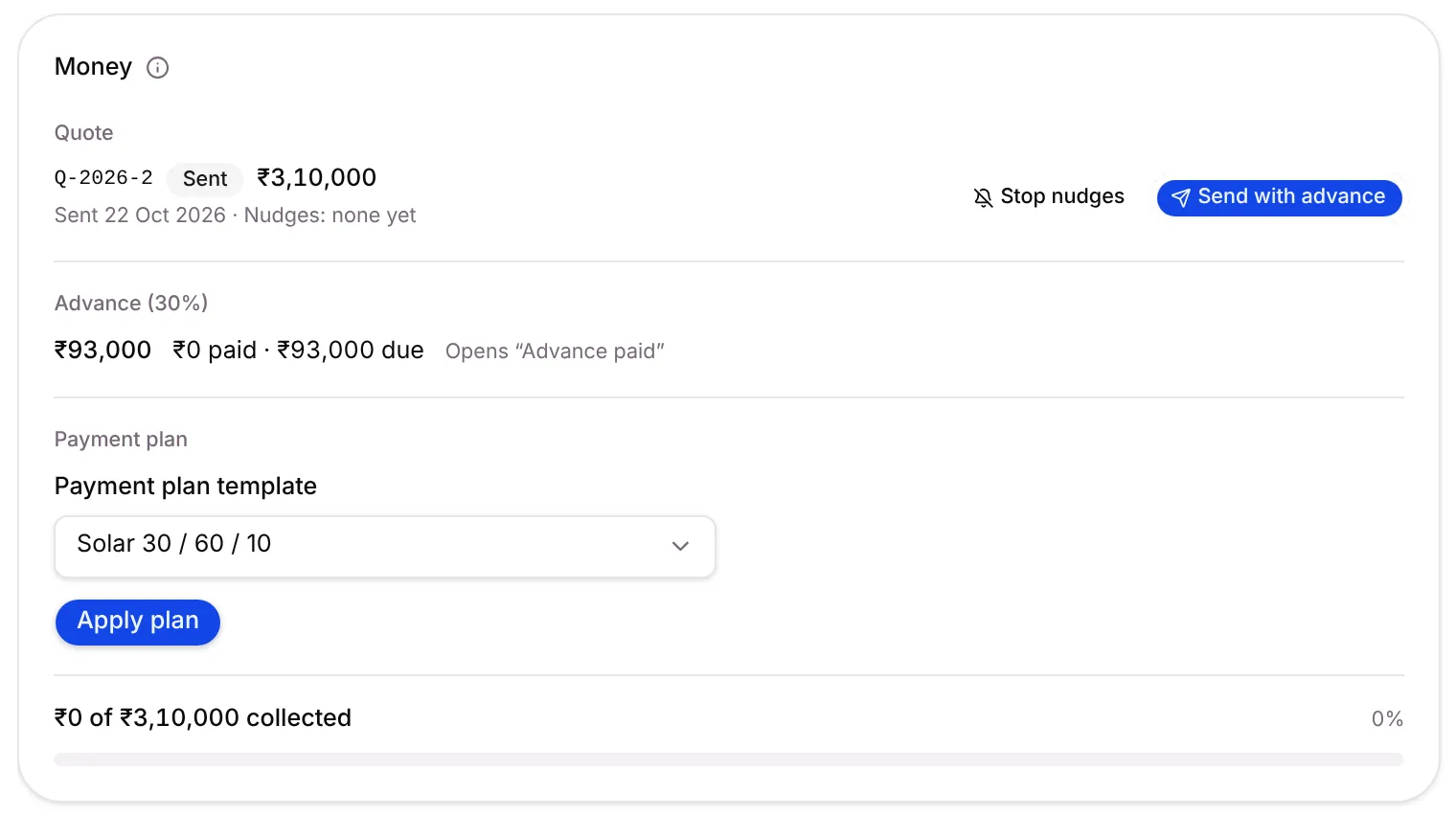
Send with advance sends one WhatsApp message with the quote PDF, the advance amount, and two buttons: Approve quote and Need changes. With Razorpay connected it carries a payment link; otherwise your UPI or bank details. The advance is 30% unless your stage settings say otherwise, and you can change it in the dialog.
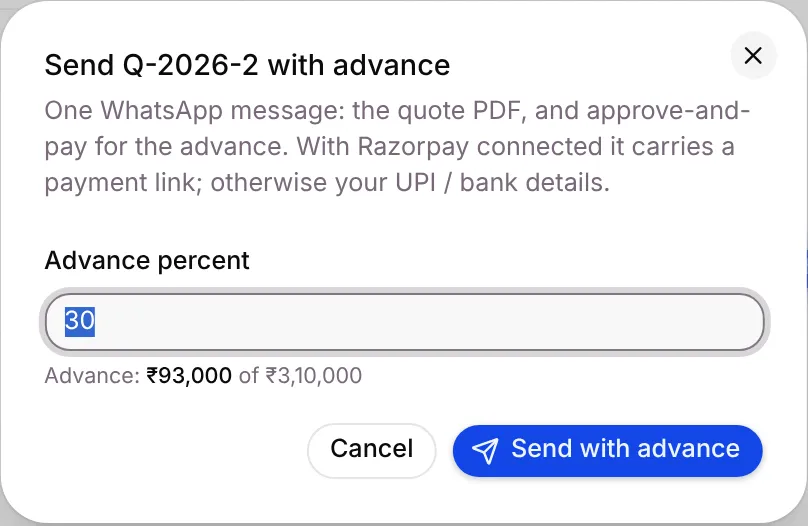
If Mrs. Lakshmi goes quiet, Setaflow nudges her for you:
| Day | What happens |
|---|---|
| Day 0 | Quote sent |
| Day 2 | First nudge |
| Day 5 | Second nudge |
| Day 9 | Last nudge, then it stops (all nudges sent) |
Nudges stop early as soon as she writes anything, approves or rejects the quote, the quote expires, the advance is confirmed, or someone clicks Stop nudges. If she taps Need changes, your team gets a note to call her and revise the quote.
Step 5: The advance is paid and confirmed
Section titled “Step 5: The advance is paid and confirmed”- Razorpay link: marked paid on its own.
- UPI, cash, cheque or bank transfer: the payment waits in Advances to confirm. If she replies with the UTR or a screenshot, Setaflow attaches it. The Owner or an Admin checks the bank and clicks Confirm.

Confirming opens the locked stage, moves her record to Advance paid, and stops the quote’s nudges.
Step 6: The payment plan takes over
Section titled “Step 6: The payment plan takes over”The rest of the price is split by a payment plan, for example Solar 30 / 60 / 10. Apply it from the record’s Money card with Apply plan. The paid advance counts towards the first part.
- Each line falls due on its own: on apply, after some days, or when the record reaches a stage, such as Installed.
- When a line falls due, Mrs. Lakshmi gets a payment message. Reminders follow 3, 7 and 15 days later.
- A line past its due date plus the plan’s grace days (7 by default) shows in Overdue with the record owner’s name.
See Invoices and dues and Payment plans.
Step 7: Installation goes to the technician
Section titled “Step 7: Installation goes to the technician”Your team creates the installation job in Field jobs and assigns a technician. Some stages create a job on their own, for example Send the quote after Visited.
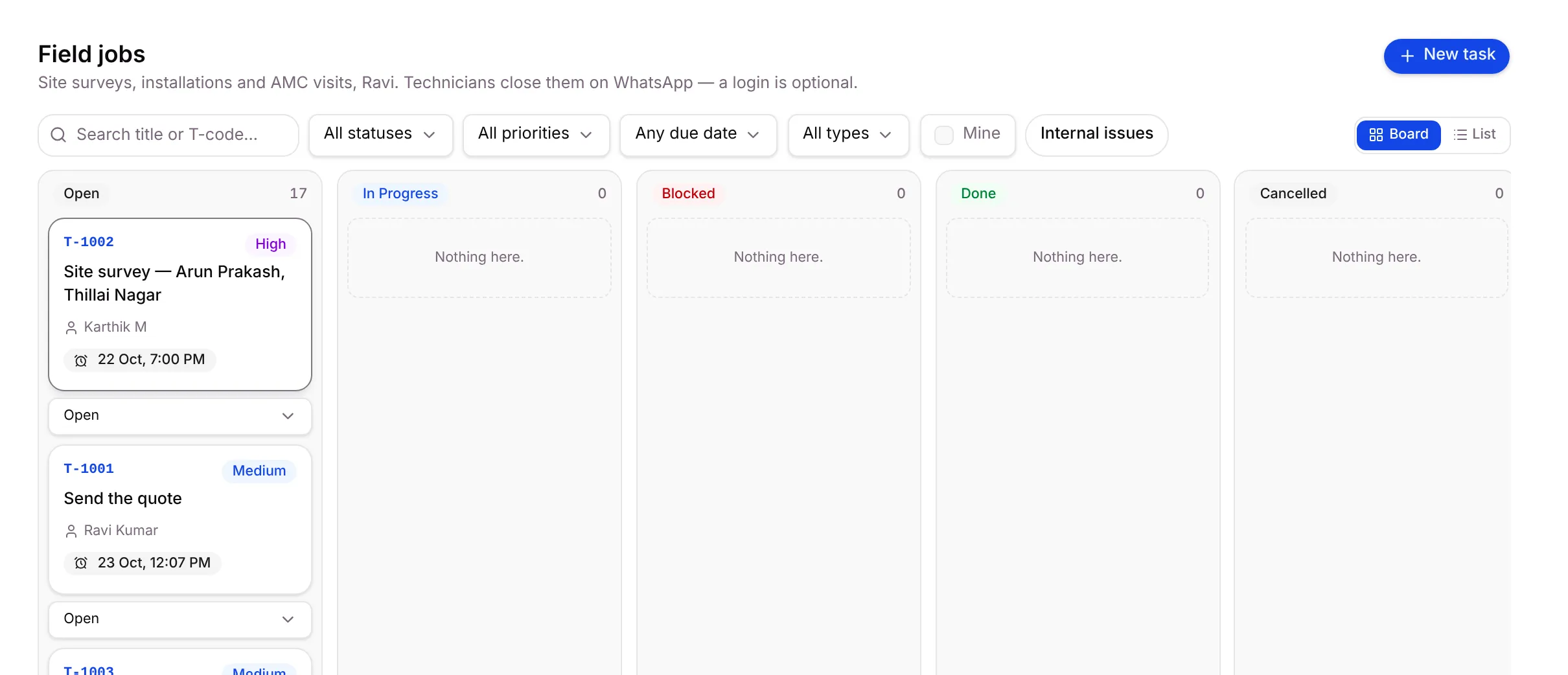
The technician gets the job on his own WhatsApp, with Done and Can’t do buttons. He has no login. He replies DONE (or finished, ho gaya, mudinjiduchu…) and sends photos, which attach to the job.
Step 8: Handover starts the AMC
Section titled “Step 8: Handover starts the AMC”When her record reaches Handed over, the stage’s Start a contract step creates her AMC contract on your contract plan (for solar, 4 visits a year, 90 days apart) and can send her a welcome message.
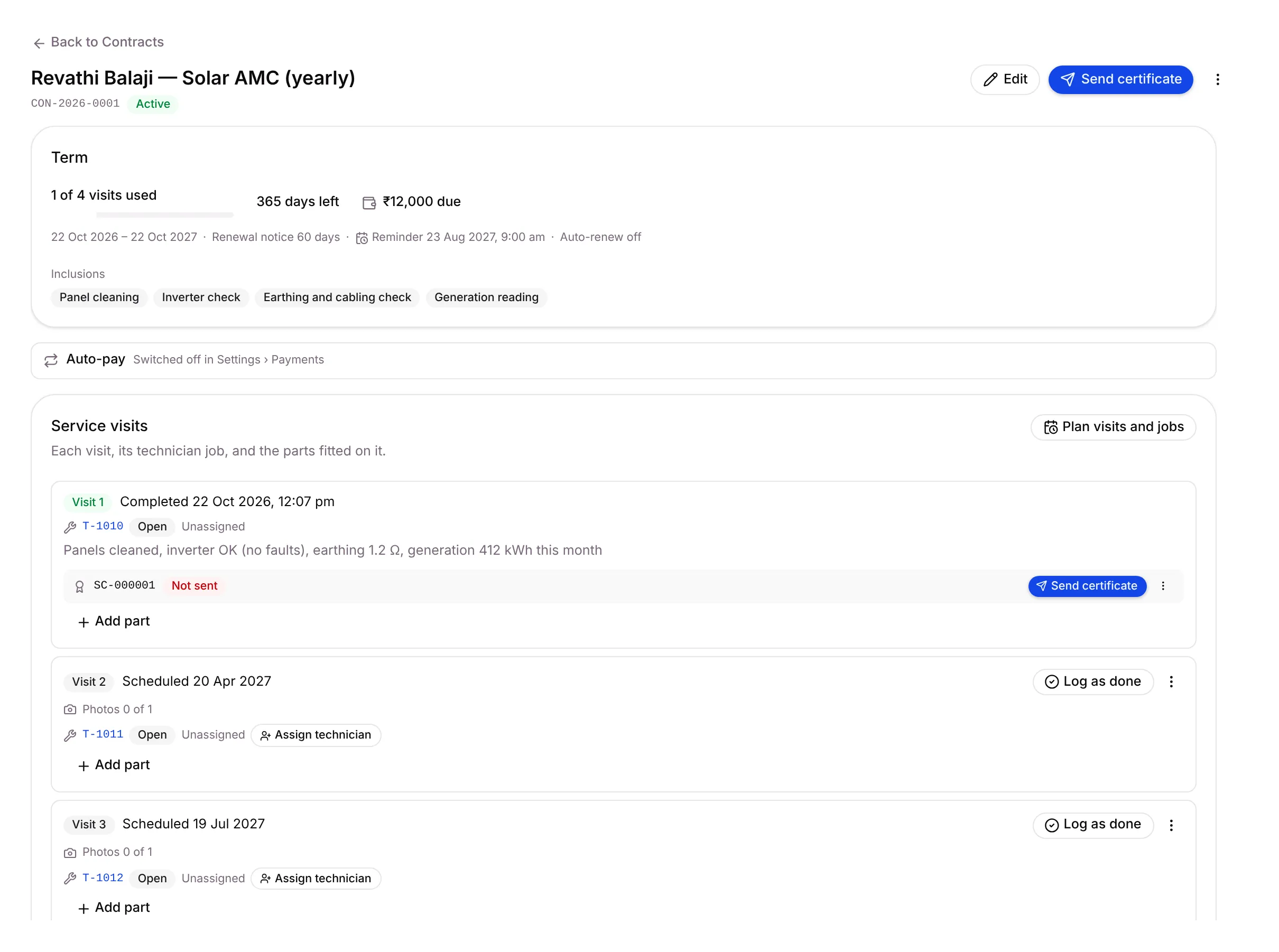
The contract plans every visit for the term and creates one field job per visit. Visit jobs start Unassigned; when you click Assign technician, he gets it on WhatsApp.
Step 9: Each visit closes with a certificate
Section titled “Step 9: Each visit closes with a certificate”A visit closes when the technician replies DONE after sending the required photos, or when the office clicks Log as done on the contract.
Setaflow then issues a service certificate (number SC- and six digits) and sends it to Mrs. Lakshmi on WhatsApp, with the work done, photos and the next visit date. Find them all in Certificates.
Step 10: A breakdown complaint comes in
Section titled “Step 10: A breakdown complaint comes in”Months later, the inverter trips. Your team raises it in Complaints with New complaint, or with Raise complaint from her chat in the Inbox.
- Setaflow checks her contract and marks the complaint Covered by AMC or Chargeable.
- A response clock starts (30 minutes by default).
- Assign technician creates the breakdown job and sends it to him on WhatsApp.
- Close complaint records what was done and can send her a closing message.
If you switch on Raise from WhatsApp in Task types, an AMC customer can also raise a complaint by tapping Report a problem or sending a trigger word.
Step 11: The renewal
Section titled “Step 11: The renewal”Before her contract ends, Setaflow starts the renewal by itself:
| When | What happens |
|---|---|
| 60 days before | A renewal quote and payment request are created, and the first reminder goes out with the quote |
| 30 days before | Second reminder |
| 7 days before | Last reminder |
| Renewal paid | The next term starts and next year’s visits are planned |
The contract shows on Today under Renewals due in 30 days. If she pays outside Setaflow, open the contract and click Renew. See Contracts.
Every Monday: the Monday review
Section titled “Every Monday: the Monday review”Every Monday at 9:00 am, the owner gets the week’s review on WhatsApp, by email and in the app. It lists enquiries never answered, quotes open 7+ days, visits with no advance, dues over 30 days, renewals coming up and advance-lock overrides, each with a name and a date. Open it any time from Review › Monday review.
See Monday review.
Quick reference
Section titled “Quick reference”| # | Step | Desk | Main screen |
|---|---|---|---|
| 1 | Enquiry comes in | Lead | Lead sources |
| 2 | Check questions | Lead | Records |
| 3 | Site visit | Lead | Calendar |
| 4 | Quote with advance | Money | Quotes |
| 5 | Advance confirmed | Money | Advances to confirm |
| 6 | Payment plan | Money | Invoices and dues |
| 7 | Installation | Service | Field jobs |
| 8 | Handover starts the AMC | Service | Contracts |
| 9 | Visit and certificate | Service | Certificates |
| 10 | Complaint | Service | Complaints |
| 11 | Renewal | Service | Contracts |
| 12 | Monday review | All | Monday review |
Good to know
Section titled “Good to know”- WhatsApp templates must be approved by Meta. Nudges, reminders and renewal messages outside the 24-hour chat window use approved templates. If a template isn’t approved, that message is skipped.
- Stage moves are set per record type. Which events move a record (visit booked, quote sent, advance paid…) is chosen in Record types and stages.
- Your words may differ. Your records might be called Jobs or Projects instead of Enquiries.
What’s next?
Section titled “What’s next?”Related articles
Section titled “Related articles”Was this article helpful?
Thanks for letting us know.