

How to open Settings, how its tabs are grouped, and which article covers each tab.
Settings is where you set up Setaflow for your business: your trade’s stages and words, your team, your WhatsApp number, where leads come from, how customers pay you, and your plan. Most of it is filled in for you when Setaflow installs your trade’s starter pack. After that you change only what’s different in your business.
Open Settings
Section titled “Open Settings”Settings opens from your profile menu at the bottom of the sidebar.
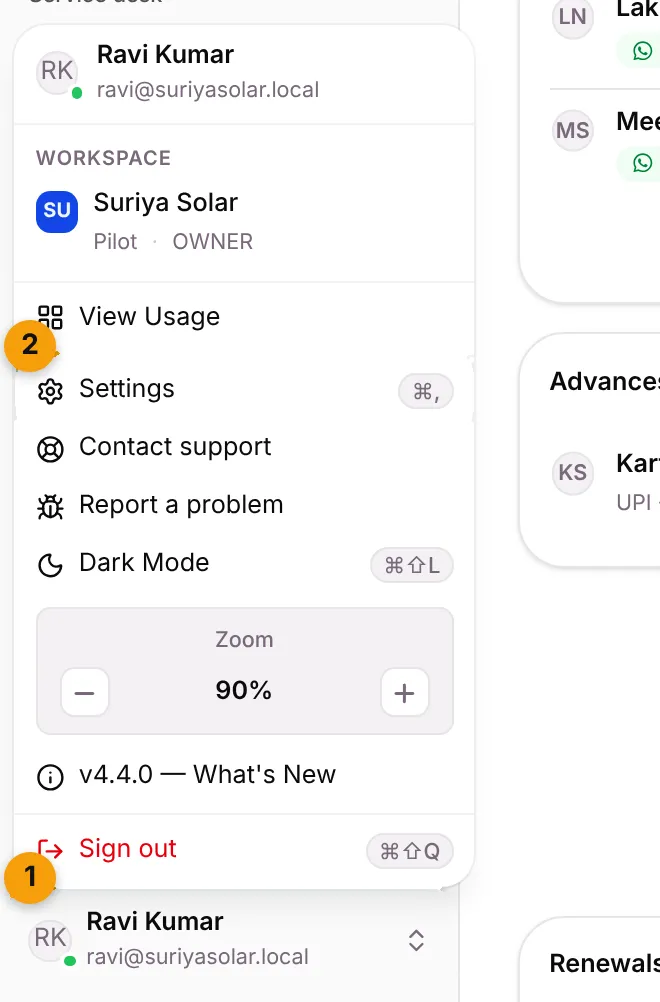
- Click your name at the bottom of the sidebar.
- Choose Settings. The menu shows its keyboard shortcut, ⌘ + ,, next to it.
Settings always opens on General, your business name, address and time zone.
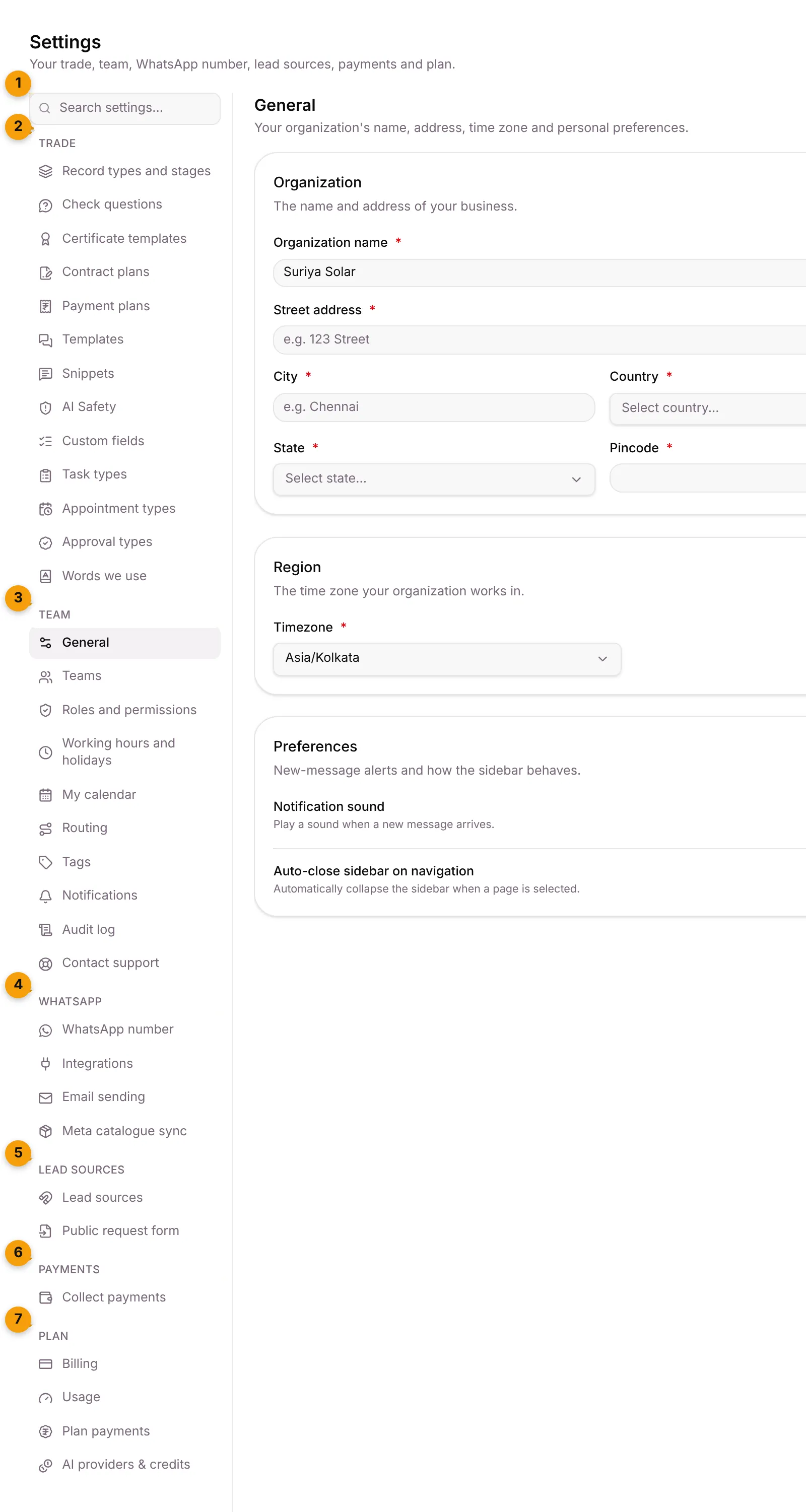
- Search settings…: type a word, such as payment or round robin, and press Enter to open the first match. Press Esc to clear it.
- Trade: how your work runs, from record types and stages to the words your team uses.
- Team: your people, their roles, working hours, routing and notifications.
- WhatsApp: your WhatsApp number and connected apps.
- Lead sources: where enquiries come from.
- Payments: how customers pay you.
- Plan: your Setaflow plan, usage and AI credits.
Who sees what
Section titled “Who sees what”- Owner and Admin see the Trade tabs. Staff don’t.
- Only the Owner sees Roles and permissions and Audit log, and can add team members.
- Some tabs depend on your plan. If you don’t see a tab in the list below, your plan doesn’t include it. A tab you open from a link but can’t use says isn’t included in your plan and offers See plans.
- Starter packs is only shown to the Setaflow team (Super Admin).
Every tab and where to read about it
Section titled “Every tab and where to read about it”| Tab | What it sets | Article |
|---|---|---|
| Record types and stages | What you sell or deliver, its stages, and what happens at each stage | Record types and stages |
| Check questions | The questions WhatsApp asks every new enquiry | Check questions |
| Certificate templates | The service certificate sent after a maintenance visit | Certificate templates |
| Contract plans | The AMC and warranty contracts you sell | Contract plans |
| Payment plans | How a job’s money is split into an advance and later parts | Payment plans |
| Templates | Your WhatsApp and email templates | Templates |
| Snippets | Saved replies you insert in a chat | — |
| AI Knowledge, Seta AI Quality, AI Safety, AI Agent | What Seta AI knows and how it replies (plan-dependent) | — |
| Custom fields | Your own fields on contacts, records, tickets and appointments | Custom fields |
| Task types | The kinds of work your team logs, and complaint response times | Task types |
| Appointment types | What a booking can be and how long it takes | Appointment types |
| Approval types | The kinds of “yes” you collect from a customer | Approval types |
| Words we use | What your team calls a record, the won stage and a visit | Words we use |
| Starter packs | Ready-made setups for a trade (Setaflow team only) | Starter packs |
| Tab | What it sets | Article |
|---|---|---|
| General | Business name, address, time zone, notification sound | — |
| Teams | Your team members and no-login technicians | Team and technicians |
| Roles and permissions | What each role can see and do | Roles and permissions |
| Working hours and holidays | When you’re open, for bookings and WhatsApp slots | — |
| My calendar | Sends your visits to your Google Calendar or Outlook | — |
| Routing | Shares new conversations out round-robin | — |
| Tags | Department and user tags | — |
| Notifications | Which alerts you get, and the Monday review | Monday review |
| Audit log | Who did what, and when | — |
| Contact support | Send a request to the Setaflow support desk | — |
| Tab | What it sets | Article |
|---|---|---|
| WhatsApp number | Your connected WhatsApp number and its sync | WhatsApp number |
| Integrations | Connected apps and channels | — |
| Email sending, Developer API, Voice AI Agent, Meta catalogue sync, Seta on WhatsApp, Sync review | Extra channels and tools, shown when your plan includes them | — |
Lead sources
Section titled “Lead sources”| Tab | What it sets | Article |
|---|---|---|
| Lead sources | Facebook, IndiaMART, Justdial, website and more; speed-to-lead and follow-up timing | Lead sources settings |
| Public request form | A form link customers use to send an enquiry or report a problem | — |
Payments
Section titled “Payments”| Tab | What it sets | Article |
|---|---|---|
| Collect payments | Razorpay, UPI and bank details, and who confirms payments | Collect payments |
| Tab | What it sets | Article |
|---|---|---|
| Billing | Your plan, add-ons and invoices | — |
| Usage | Limits, storage and WhatsApp usage | — |
| Plan payments | Pay for your plan or record a payment | — |
| AI providers & credits | Where Seta AI runs and your AI credits | — |
Good to know
Section titled “Good to know”- Changes apply from now on. A job keeps the payment plan it was given. A contract keeps the price it was sold at.
- Unsaved changes are protected. If you leave a form you’ve changed, Setaflow asks Discard changes? first.
- A tab can be switched off. If you see is switched off for your organization, nothing was deleted. Ask the Setaflow team to switch it back on.
What’s next?
Section titled “What’s next?”Related articles
Section titled “Related articles”Was this article helpful?
Thanks for letting us know.