

Set the up to three WhatsApp questions every new enquiry gets, and which answers mark an enquiry as Junk.
Check questions are up to three short questions WhatsApp asks every new enquiry, with buttons to tap. The answers sort each enquiry into Real or Junk, so your team spends its time on real buyers.
Go to Settings › Check questions.
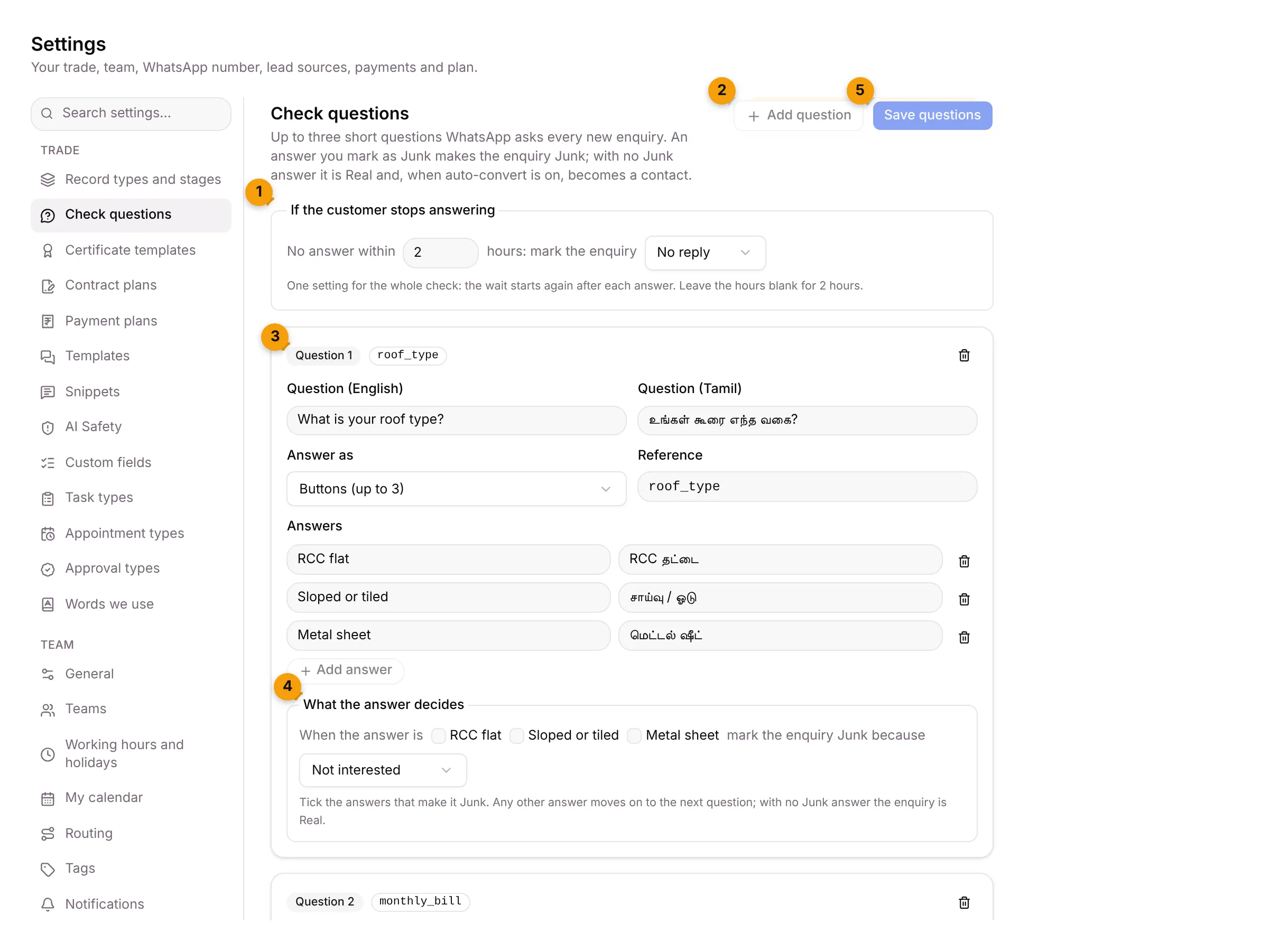
- If the customer stops answering: how long to wait, and what to mark the enquiry if there’s no reply.
- Add question: add a question, up to three.
- Question 1: each question has its English and Tamil text, how it’s answered, and its answers.
- What the answer decides: tick the answers that make the enquiry Junk.
- Save questions: saves all your changes at once.
How the check works
Section titled “How the check works”- A new enquiry arrives on WhatsApp.
- Setaflow sends Question 1. When the customer answers, it sends the next question.
- If an answer is one you marked as Junk, the enquiry becomes Junk and the check stops.
- If no answer is Junk, the enquiry is Real. When auto-convert is on, it becomes a contact.
- If the customer stops answering, the enquiry is marked after the wait you set.
Change a question
Section titled “Change a question”- Under the question, edit:
- Question (English) and Question (Tamil), for example What is your roof type?
- Answer as: Buttons (up to 3), List (up to 10) or Free text.
- Answers: each answer in English and Tamil. Click Add answer for another one.
- Under What the answer decides, tick the answers that make the enquiry Junk, and pick the reason: Not interested, Out of our area, Wrong number or Other.
- Click Save questions. To undo your changes before saving, click Cancel.
Set the wait for no reply
Section titled “Set the wait for no reply”Under If the customer stops answering:
- Type the hours in No answer within, from 1 to 72. Leave it blank for 2 hours.
- Choose what to mark the enquiry: No reply or Junk.
- Click Save questions.
The wait starts again after each answer.
Add a question
Section titled “Add a question”- Click Add question. You can have up to three.
- Fill in the English text, the answers and the Junk rule.
- Give it a Reference, a short internal name.
- Click Save questions.
Common errors
Section titled “Common errors”| Message | What to do |
|---|---|
| Question 1 needs its English text. | Type the question in English. |
| At most 3 questions. | Remove a question before adding another. |
Where it shows up
Section titled “Where it shows up”- Each new enquiry is marked Real, Junk or No reply from the answers, and the conversation is in the Inbox.
- The questions themselves go out from your WhatsApp number.
Good to know
Section titled “Good to know”- Owners and Admins can open this tab.
- No questions means no check. Without questions, new enquiries aren’t checked.
- Your starter pack usually adds three questions in English and Tamil.
What’s next?
Section titled “What’s next?”Related articles
Section titled “Related articles”Was this article helpful?
Thanks for letting us know.