

A tour of the Setaflow sidebar, the three desks, the Monday review and the starter pack that sets it all up for your trade.
Setaflow takes every enquiry to an advance, and every AMC visit to a renewal. It is built for businesses that install, service and renew, such as rooftop solar, lifts, AC, water treatment, fire safety and CCTV. Everything you need sits in the sidebar on the left, grouped into desks.
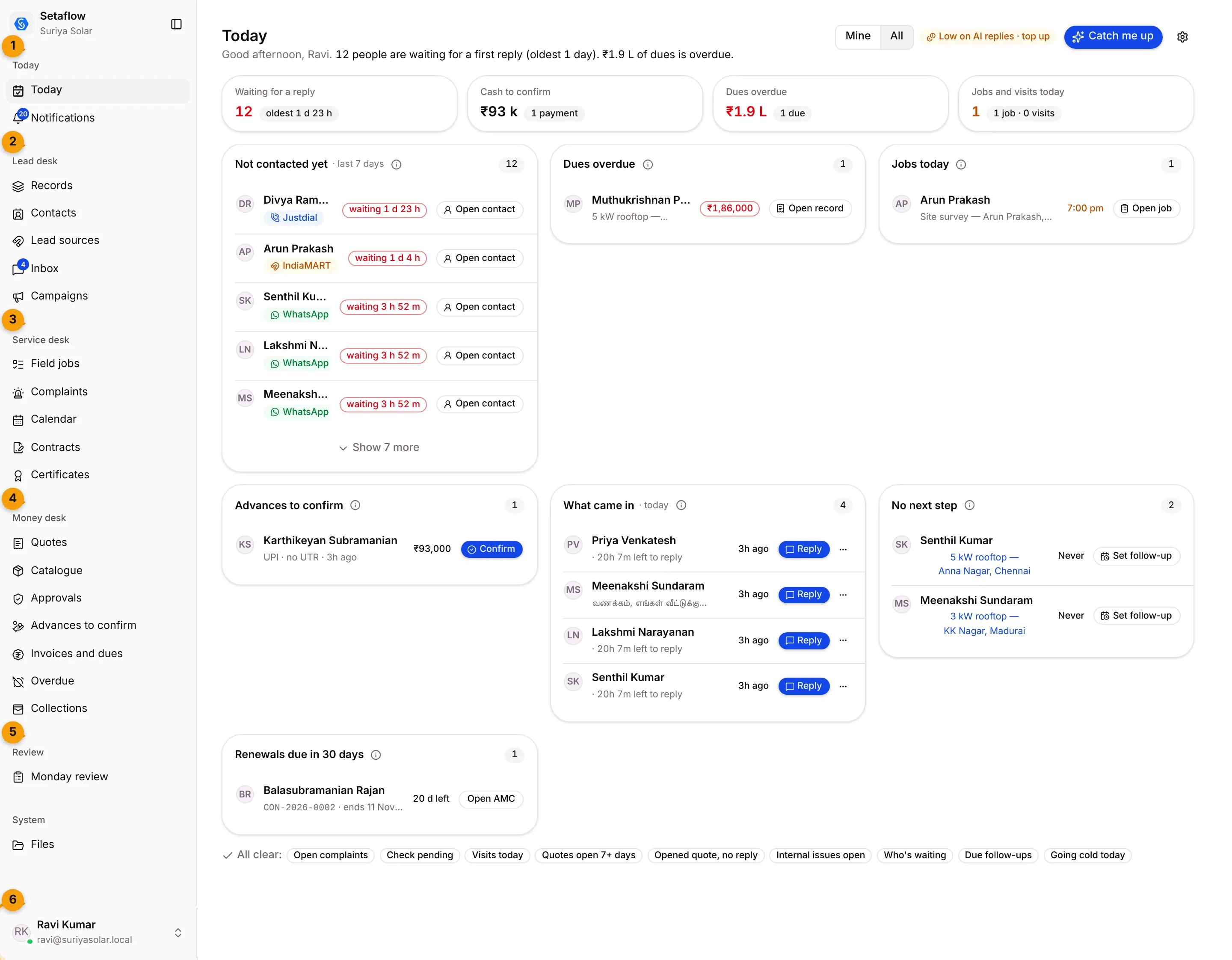
- Today: your daily work list (Today) and your alerts (Notifications).
- Lead desk: every enquiry, from the first message to the quote. Records, Contacts, Lead sources and Inbox.
- Service desk: the work after the sale. Field jobs, Complaints, Calendar, Contracts and Certificates.
- Money desk: every rupee on the record. Quotes, Catalogue, Approvals, Advances to confirm, Invoices and dues, Overdue and Collections.
- Review: the weekly Monday review, and AI proposals if your plan includes them.
- Your name: opens your profile menu, with Settings, Contact support, Report a problem, dark mode and Sign out.
The sidebar groups
Section titled “The sidebar groups”| Group | Screens | Use it to… |
|---|---|---|
| Today | Today, Notifications | Start your day and catch what just changed |
| Lead desk | Records, Contacts, Lead sources, Inbox | Capture enquiries, sort real buyers, reply on WhatsApp |
| Service desk | Field jobs, Complaints, Calendar, Contracts, Certificates | Send jobs to technicians, run AMC visits, handle breakdowns |
| Money desk | Quotes, Catalogue, Approvals, Advances to confirm, Invoices and dues, Overdue, Collections | Quote, collect the advance and chase what is due |
| Review | Monday review, AI proposals | See what slipped this week and who fixes it |
What appears in your sidebar depends on your role and your plan. A screen your role can’t open, or your plan doesn’t include, is simply left out. Some screens, such as Campaigns, Voice Calls and Automation in the Lead desk, only appear on plans that include them. See Roles and access.
The three desks
Section titled “The three desks”Lead desk: every enquiry to an advance
Section titled “Lead desk: every enquiry to an advance”- Enquiries from WhatsApp, Meta ads, IndiaMART, Justdial and your website land in one list, with their source.
- Up to three quick check questions on WhatsApp mark each enquiry Real, Junk or No reply.
- A real enquiry becomes a contact and a record on its own, so your team starts from a clean list.
Screens: Records, Contacts, Lead sources, Inbox
Money desk: every rupee on the record
Section titled “Money desk: every rupee on the record”- Send with advance sends the quote and the advance request in one WhatsApp message.
- Reminders follow on day 2, 5 and 9 until the customer replies or decides.
- Stages that need the advance stay locked until it is confirmed.
- The rest of the price falls due through a payment plan, and late lines show in Overdue with a name against each one.
Screens: Quotes, Advances to confirm, Invoices and dues, Overdue, Collections
Service desk: every AMC visit to a renewal
Section titled “Service desk: every AMC visit to a renewal”- Jobs go to technicians on their own WhatsApp. They need no login and close jobs by replying DONE with photos.
- Handing over a job starts the AMC contract and plans its visits.
- Each closed visit sends a service certificate to the customer.
- Renewal reminders go out 60, 30 and 7 days before the contract ends, with the renewal quote.
Screens: Field jobs, Complaints, Calendar, Contracts, Certificates
The Monday review
Section titled “The Monday review”Every Monday morning the owner gets a short review on WhatsApp, by email and in the app. It lists what leaked during the week (enquiries nobody answered, quotes still open, visits with no advance, dues over 30 days, renewals coming up), each with a person’s name and a date. You can also open it any time from Review › Monday review.
See Monday review.
Starter packs: set up for your trade
Section titled “Starter packs: set up for your trade”You don’t build Setaflow from scratch. When your business is set up, the Setaflow team installs a starter pack for your trade, such as Rooftop solar, Lifts and elevators, AC and HVAC, Fire safety, CCTV and security, Water treatment, RO and STP, Interiors and modular kitchens, Installation or AMC.
A pack fills in your record types and stages, check questions, task and appointment types, contract plans, payment plans, certificate template and the words your trade uses. Everything it creates is ordinary settings that you can change later.
Your trade’s own words
Section titled “Your trade’s own words”Setaflow uses your trade’s words. For example, the contracts screen is called Contracts for most AMC trades and Warranties for interiors, and records may be called Enquiries, Jobs or Projects. If a label on your screen differs from these docs, it was set in Words we use.
Good to know
Section titled “Good to know”- Today is your home screen. Setaflow opens on Today after you sign in.
- Technicians don’t need a login. They are added in Settings › Teams as no-login collaborators and work on WhatsApp.
- There is no global search box. Use Ctrl+K to jump to a screen, and each screen’s own search (press /) to find an item.
What’s next?
Section titled “What’s next?”Related articles
Section titled “Related articles”Was this article helpful?
Thanks for letting us know.