

Every payment line past its due date and grace days, longest late first, with the person who owns the enquiry.
Overdue lists every payment-plan line that is still unpaid after its due date plus the plan’s grace days. The longest-late line is at the top, and each one shows who owns the enquiry, so every late rupee has someone chasing it.
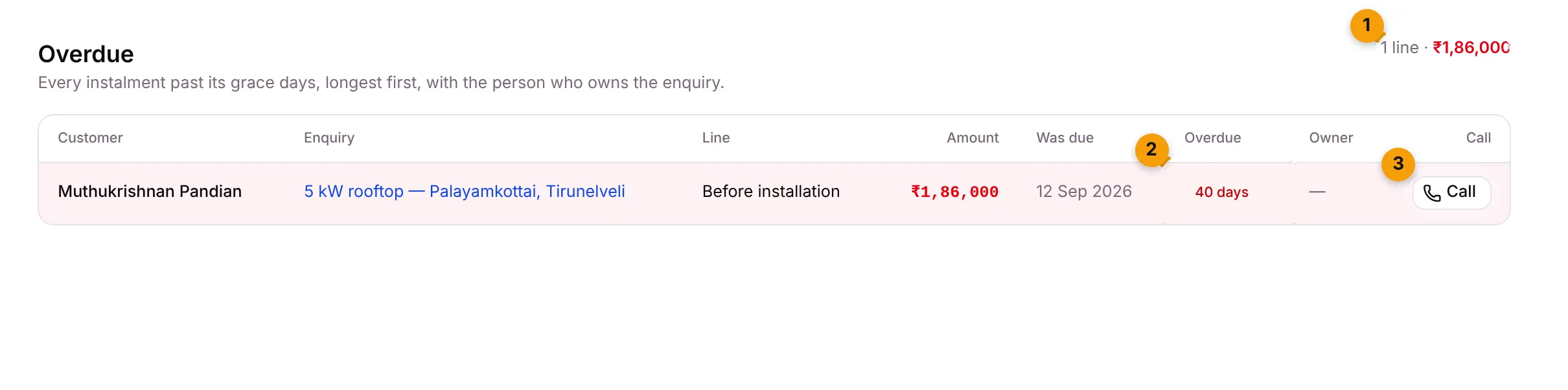
- Summary: how many lines are late and the total, in red.
- Overdue: how many days late each line is.
- Call: opens the customer’s page.
What each column shows
Section titled “What each column shows”| Column | What it shows |
|---|---|
| Customer | The contact who owes the money, for example Muthukrishnan Pandian. |
| Enquiry | The enquiry. Click to open it. |
| Line | The plan line, for example Before installation. |
| Amount | The amount still owed, in red. |
| Was due | The date it fell due. |
| Overdue | How many days late, for example 40 days. |
| Owner | The person who owns the enquiry. — means nobody is assigned. |
| Call | Opens the contact’s page. It doesn’t dial. |
When a line shows here
Section titled “When a line shows here”A line shows here once the due date plus the grace days has passed and it’s still Due or Invoiced. The grace is 7 days unless your payment plan says otherwise.
Before that, Setaflow has already reminded the customer 3, 7 and 15 days after the due date, and created a follow-up task for the owner. See Invoices and dues.
A line leaves the list when it’s paid and confirmed, or waived.
Chase an overdue line
Section titled “Chase an overdue line”- Go to Overdue.
- Click Call on the row to open the customer.
- Call or message them.
- When they pay by UPI or bank transfer, confirm it in Advances to confirm.
Good to know
Section titled “Good to know”- When nothing is late, you see Nothing overdue.
- Today shows the same lines on the Dues overdue card and tile. See Today.
- The Monday review lists dues over 30 days late against each person. See Monday review.
- If you don’t see Overdue, your plan doesn’t include payment schedules.
What’s next?
Section titled “What’s next?”Related articles
Section titled “Related articles”Was this article helpful?
Thanks for letting us know.