

The UPI, bank transfer, cheque and cash payments a customer says they've made, waiting for the Owner or an Admin to check the bank and confirm.
When a customer pays by a Razorpay link, Setaflow marks the payment paid on its own. When they pay by UPI, bank transfer, cheque or cash, only your bank statement can say the money really came in. Advances to confirm lists those payments until someone checks the bank and clicks Confirm. The advance counts from that moment.
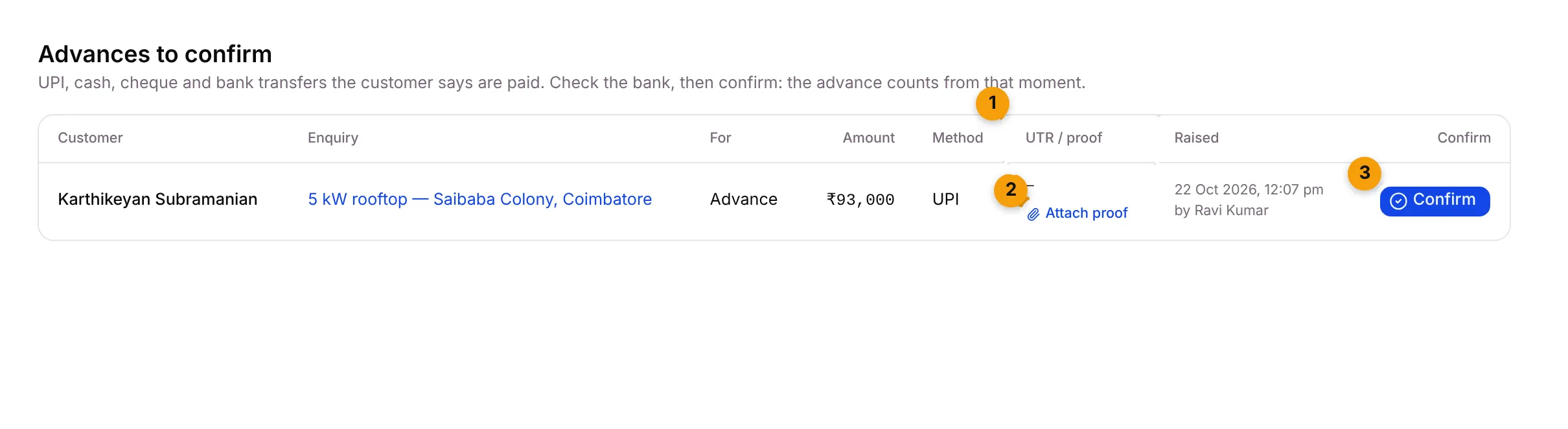
- UTR / proof: the UTR or reference number, the customer’s payment screenshot, and what Setaflow read from it.
- Attach proof: add the screenshot or PDF yourself when the customer sent it another way.
- Confirm: mark the payment as received, after you’ve checked the bank.
What each column shows
Section titled “What each column shows”| Column | What it shows |
|---|---|
| Customer | The contact. Click to open them. |
| Enquiry | The enquiry the payment belongs to. Click to open it. |
| For | What the payment is for: Advance, Token, Instalment, AMC renewal and so on. |
| Amount | The amount asked for. If the proof shows a different amount, you also see proof: ₹… under it. |
| Method | UPI, Cash, Bank transfer or Cheque. |
| UTR / proof | The UTR or cheque number, where it came from (from WhatsApp, from Telegram or read from proof), View proof, and a check badge. |
| Raised | When the payment was asked for, and by whom. |
| Confirm | The Confirm button. |
Proof check badges
Section titled “Proof check badges”When a customer sends a payment screenshot, Setaflow reads it and compares it with the payment.
| Badge | What it means | What to do |
|---|---|---|
| Ready to confirm | The proof shows a UTR and the right amount. | Check the bank, then confirm. |
| Amount differs | The proof shows a different amount. | Check how much really came in before confirming. |
| UTR differs | The UTR on the proof doesn’t match the one on the payment. | Check which UTR is right in your bank statement. |
| Reading proof… | Setaflow is still reading the image. | Wait a few seconds; the list refreshes on its own. |
| Couldn’t read proof | The image couldn’t be read. | Open the proof and check the UTR and amount yourself. |
A PDF proof isn’t read, so it has no badge. Open it with View proof.
How the UTR and proof get filled in
Section titled “How the UTR and proof get filled in”When the customer replies on WhatsApp after paying:
- A UTR, UPI, IMPS, NEFT or RTGS reference in their message becomes the payment’s UTR. A UTR already on the payment is never replaced.
- A screenshot or PDF they send becomes the proof, unless your team already attached one.
- A note is added to the contact’s timeline.
This only works when the customer has exactly one payment waiting. Setaflow never marks a payment paid on its own, and never messages the customer about it.
Attach proof yourself
Section titled “Attach proof yourself”- Find the payment and click Attach proof.
- Choose an image (PNG, JPEG, WebP or BMP) or a PDF, up to 10 MB.
You see Proof attached. Reading it now. An image gets a badge once it’s read.
Confirm a payment
Section titled “Confirm a payment”- Check your bank statement for the UTR and the amount.
- Find the payment in Advances to confirm.
- Click Confirm.
You see Payment confirmed. The advance counts from now. and the row leaves the list.
When you confirm, Setaflow:
- marks the payment paid and gives it a receipt number, such as RCPT-…;
- tells the enquiry’s owner Payment received;
- opens the advance lock, so the enquiry can move to stages that need the advance;
- moves the enquiry to its “advance paid” stage, if your stages have one;
- settles the matching line of the payment plan;
- stops the quote’s nudges;
- renews the contract, for an AMC renewal payment.
Why confirming matters
Section titled “Why confirming matters”A stage that needs an advance stays locked until the confirmed advance is enough. Moving an enquiry into it shows … is locked until the advance is in, with what’s needed, what’s confirmed and how short it is. Payments still waiting here don’t count. The Owner can override the lock with a reason, which shows in the Monday review.
Good to know
Section titled “Good to know”- Where these payments come from. A UPI or bank-transfer advance from Send with advance on a quote, a payment raised on a contact or enquiry, and plan lines that already have a UTR or proof.
- Razorpay payments don’t appear here. They’re marked paid on their own.
- When the list is empty, you see Nothing to confirm.
- Today shows the same payments under Advances to confirm, and the Cash to confirm tile adds them up. See Today.
What’s next?
Section titled “What’s next?”Related articles
Section titled “Related articles”Was this article helpful?
Thanks for letting us know.