

Every service certificate issued after an AMC visit, whether it reached the customer, and how to send it again or re-issue it.
A service certificate is a one-page PDF the customer gets on WhatsApp after each AMC visit is closed. It shows what was done, the technician’s photos, when the technician was on site, and when the next visit is due. Each one has a number such as SC-000001. The Certificates screen lists them all.
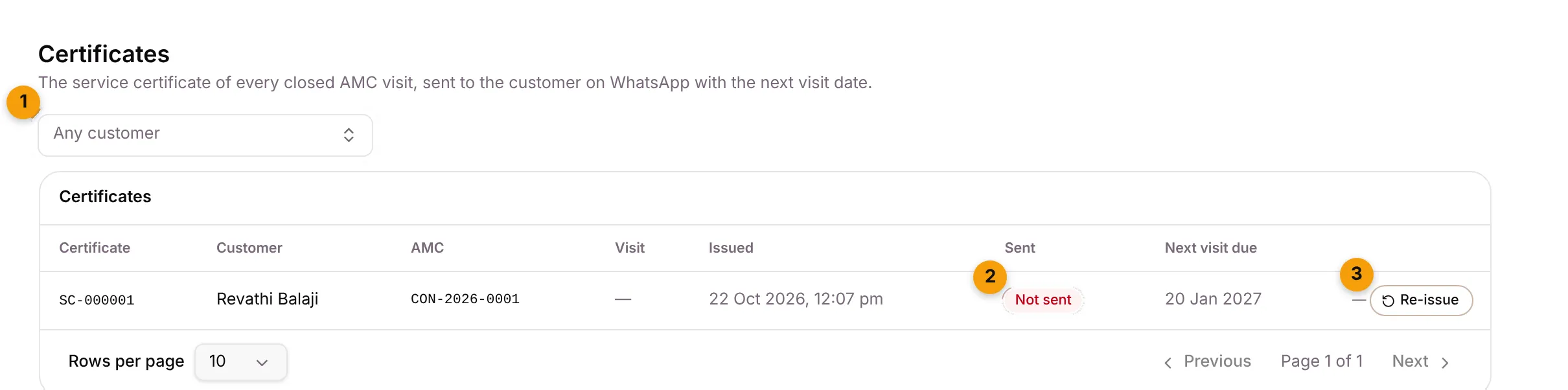
- Any customer: show only one customer’s certificates.
- Sent: Sent with the date (green), Not sent (red) or Sending… (grey). Point at Not sent to see why.
- Re-issue: make the certificate again and send it. Open PDF, next to it, opens the certificate.
What each column shows
Section titled “What each column shows”| Column | What it shows |
|---|---|
| Certificate | The certificate number, such as SC-000001. |
| Customer | Who it was sent to. Click the name to open the contact. |
| AMC | The contract number and plan. |
| Visit | Which visit of the contract it’s for. |
| Issued | When it was made. |
| Sent | Whether it reached the customer on WhatsApp. |
| Next visit due | The next visit date printed on the certificate. It’s blank when the plan has no visit interval. |
Click a row to open the contract the visit belongs to.
Send a certificate that wasn’t sent
Section titled “Send a certificate that wasn’t sent”If a certificate shows Not sent, Setaflow tries again by itself, the first time after about 10 minutes. To send it yourself:
- Click the row to open the contract.
- Find the visit. Its certificate line shows Not sent.
- Click Send certificate.

When the contract has a certificate that didn’t go out, the contract’s main button also becomes Send certificate.
Re-issue a certificate
Section titled “Re-issue a certificate”Re-issue when something on the certificate was wrong, for example after you correct the visit’s outcome.
- On Certificates, click Re-issue on the row.
- Or on the contract, click ⋯ on the certificate line and choose Re-issue (new number).
The old certificate is retired and a new one, with a new number, is sent to the customer.
If a closed visit shows No certificate yet, click Issue certificate on the contract.
What the customer gets
Section titled “What the customer gets”The customer gets the certificate as a PDF on WhatsApp with a short message, for example:
Hi Revathi, today’s service visit on your solar system is done. Your service certificate SC-000123 is attached. Next visit is due on 14 Jan 2027.
The message has a Report a problem button. If you’ve switched on Raise from WhatsApp for complaints, tapping it raises a complaint for that customer.
Good to know
Section titled “Good to know”- The certificate layout comes from Certificate templates. Each contract plan can use its own template. Without one, Setaflow uses your first active template. If you have none, no certificate is made and the office sends one by hand.
- Asking for a Google review. On the same settings tab, After the visit can ask the customer for a Google review after the certificate.
- Staff who can’t edit contracts don’t see Re-issue. See Roles and access.
What’s next?
Section titled “What’s next?”Related articles
Section titled “Related articles”Was this article helpful?
Thanks for letting us know.